
Oracle Forms migration: why my APEX attempt on 200+ forms failed, and why I built ORMIT™ Open Java
I once started migrating an Oracle Forms application to APEX. The application had more than 200 forms and some reports. I migrated a few forms, and it quickly became clear that APEX was not the right choice for a migration that size: each form took too long to migrate, and each one looked and behaved like a separate application. That project is why I created ORMIT™ Open Java: to painlessly and quickly perform an Oracle Forms migration to Java, while retaining all the bells and whistles of a modern web application. Here is what happened, what I built instead, and the code that shows the difference.
An Oracle Forms application of 200+ forms
The application was a medium-sized application: more than 200 Oracle Forms and some reports. The goal was to leave Oracle Forms for a modern web application.
On paper, Oracle APEX was the natural move. It runs in the Oracle Database, and it speaks SQL and PL/SQL, the languages a Forms team already knows. So that is where I started.
Rebuilding the forms in Oracle APEX
In APEX, there was no Forms module to convert. I rebuilt each screen in Page Designer. A Forms block became a form region, an interactive grid or a report, whichever seemed to fit. Each trigger became a validation, a computation, a process or a dynamic action, rewritten by hand.
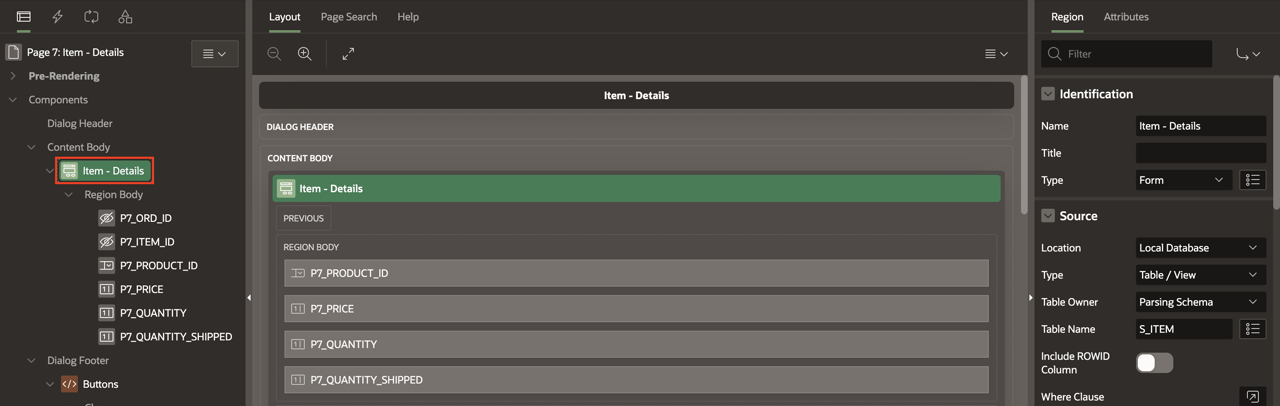
I migrated a few forms that way. For one screen, it worked. With 200 forms, every one of those choices had to be made again, form after form.
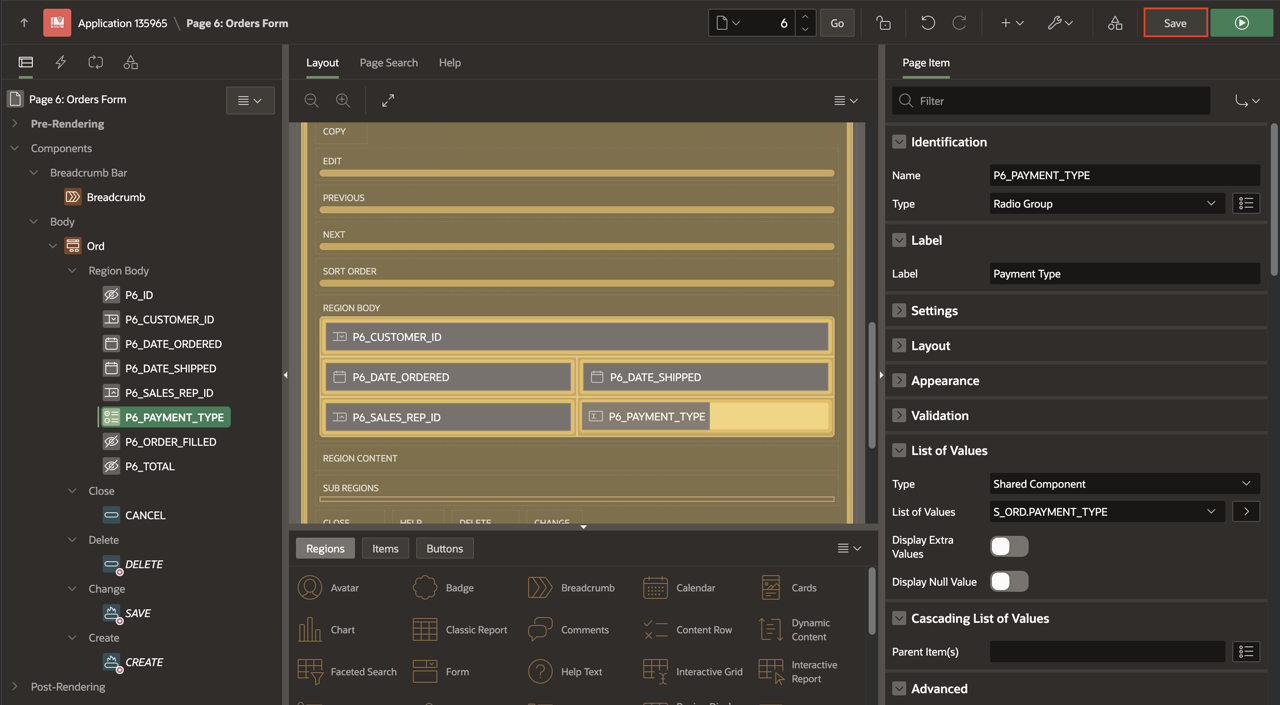
Today, that process is faster. With Oracle AI Database 26ai, AI coding agents such as Claude Code can use Oracle's APEX skills to generate the pages. But in the end, you still inherit an application without a centralized look and feel, and without a proper theme that decides how every screen looks, as modern web applications have today.
200 forms, 200 small applications
It quickly became clear that I had an issue. Two, in fact.
The first was time. Each form was taking too long to migrate, and there were 200 of them.
The second was worse. The forms behaved more like separate applications than one application. The UI and the UX changed from one form to the next, and every difference was one more thing to maintain, form by form. It was becoming a maintenance nightmare.
APEX did give the application one theme, Universal Theme. But the theme did not decide how a screen was built. Region types, template options, page CSS and page JavaScript were set page by page.
I tried to build my own APEX components
I tried to fix it from the inside. I created my own components for APEX, to make the forms look good and work the same as the original Oracle Forms, but in a unified way.
In APEX, a custom component is a plug-in or a customized template: its own PL/SQL, JavaScript and CSS, stored in the application and maintained by hand through every APEX upgrade. Each page still had to choose to use it, and to use it the same way.
It was just too much work to maintain over time. Instead of managing one application, I was managing each form. For a migration of 200+ forms, APEX was not the right choice.
What I wanted from an Oracle Forms migration
That project told me what a large migration had to deliver. Not 200 rebuilt screens, but one modern web application, with everything a web application has:
- one theme for the whole application
- components and layouts managed once, for every form
- responsive screens
- a REST API that other systems can call
- the forms' business logic carried over, not rewritten by hand
The Forms-to-Java converters on the market did not offer that either. None came close to a true modern web application. So I set out to build one.
Automated Oracle Forms migration with ORMIT™ Open Java
I designed ORMIT™ Open Java (OOJ) to convert Oracle Forms modules into a TypeScript frontend, in React or Angular, and a Java Spring Boot backend, on the same Oracle database. Each choice below answers one of the problems I had with APEX.
The examples come from Summit, Oracle's public Forms demo application, migrated with OOJ: 4 forms, 16 blocks, 130 items and 89 triggers. Every OOJ project starts from the same template, goes through the same pipeline and runs on the same shared code.
Automated migration: one pipeline for every form
In APEX, I had rebuilt every screen by hand. In OOJ, every Forms module goes through the same steps:
# After exporting each .fmb to XML with Forms2XML
workspace init SUMMIT -d dbhost:1521/ORCL -u summit   # reads tables, functions and packages from the database
normalize                                             # gives the module files the names the tools expect
extractall                                            # one .sql file per trigger and program unit
convertall                                            # PL/SQL to TypeScript, sorted into pass/ and fail/
generate ORDERS                                       # frontend, backend and REST configuration
One theme for the whole application
In APEX, one theme had not stopped each page from looking different. In OOJ, I put the whole look of the application in one file, theme.ts. Here is the start of it in Summit:
const theme: ThemeOptions = {
  direction: "ltr",
  // Emit theme values as --mui-* CSS variables so plain CSS (app.css) reads the same source of truth.
  cssVariables: true,
  palette: {
    primary: {
      // Renaps brand red
      main: "#ed1c24",
      light: "#f04c52",
      dark: "#b5141a",
      contrastText: "#fff",
    },
    appBar: {
      bg: "#ed1c24",
      fg: "#ffffff",
    },
    menu: {
      bg: "#222222",
      headerBg: "#000000",
    },
    // Fill for fields the user can't type into (Oracle Forms' read-only affordance).
    field: {
      readOnly: "#e4e7ea",
    },
    mode: "light",
  },
  spacing: (factor: number) => `${0.25 * factor}rem`, // (Bootstrap strategy)
  shape: {
    borderRadius: 4,
  },
With cssVariables on, each value also becomes a CSS variable. To rebrand an application, one example file is copied to theme.override.ts:
export default {
  palette: {
    primary: { main: "#0057b8", light: "#3d82d6", dark: "#003f87", contrastText: "#fff" },
    appBar: { bg: "#0057b8", fg: "#ffffff" },
    menu: { bg: "#1b2a3a", headerBg: "#0e1824" },
  },
It is deep-merged over the base theme. A change to primary.main there reaches the buttons, app bar and tabs of every form.
Behavior lives there too. One rule turns the focused field yellow in every form:
// Yellow focus fill applied app-wide to the focused input.
"&:focus-within": {
  backgroundColor: "yellow",
},
Each form keeps the colors its own Forms source defined, its visual attributes, in a small generated stylesheet scoped to that form. Everything else comes from the theme.
One React component library for every form
My APEX components only worked when each page chose to use them. In OOJ, I took that choice away: a generated form contains no styling and almost no markup. Its fields are data. This is the Name field of Summit's customer canvas:
{
  grid: {
    columnStart: 7,
    columnEnd: 93,
    rowStart: 4,
    rowEnd: 5,
  },
  components: [
    {
      type: LabelTypes.BODY1,
      label: "Name",
      colSize: 2,
      ...
    },
    {
      name: "name",
      colSize: 10,
      type: InputTypes.TEXTFIELD,
      required: true,
      inputProps: {
        item: "name",
        block: "sCustomer",
      },
    },
  ],
},
The grid values place the field on the canvas. The type says what to draw. One shared hook turns each type into a shared component:
if (isMemberOf(inputTypesValues, type)) {
  return toolTipWrapper(
    <InputWrapper input={input} itemProps={itemProps} value={inputValue} focusRef={focusRef} />
  );
}
if (isMemberOf(buttonTypesValues, type)) {
  return toolTipWrapper(<ButtonWrapper input={input} itemProps={itemProps} focusRef={focusRef} />);
}
if (isMemberOf(dataGridTypesValues, type)) {
  // The generator gives every datagrid its block and columns.
  return <DataGridWrapper input={input as DataGridInput} itemProps={itemProps} />;
}
Every text item of every form ends in the same Text.tsx, a wrapper around MUI's TextField. A fix or a new style there reaches all forms in the same release.
Summit's 4 forms came out as 114 files and 8,592 lines of configuration and logic. The 59 components they use sit outside every form, in common/components, from text fields to data grids, lists of values and menus. That is what I had tried to build by hand in APEX. This time, a form could not draw a field any other way.
Layouts and responsive screens
Forms places every item at fixed coordinates on a canvas. I did not want to copy those positions, so the converter turns each canvas into a 96-column CSS grid, and each item into grid cells:
function getCanvasGridSize()
{
    return 96;
}
...
$row = floor($item["YPosition"] / $gridSizeY);
$col = floor($item["XPosition"] / $gridSizeX);
$rowEnd = floor(($item["YPosition"] + $item["Height"]) / $gridSizeY);
$colEnd = floor(($item["XPosition"] + $item["Width"]) / $gridSizeX);
At 1,200 px and wider, equal columns keep the proportions of the original form. Below that, the shared grid container drops the Forms layout and stacks the fields in one column:
sx={
  isDesktop
    ? {
        gridTemplateColumns: template?.columns,
        gridTemplateRows: template?.rows,
        ...sx,
      }
    : { gridTemplateColumns: "minmax(0, 1fr)", ...sx }
}
Below 1,200 px the menu also becomes a drawer, and below 600 px each label and field takes the full width. None of this is in a form. It is in the shared grid, menu and window components, so every form is responsive the day it is generated.
The application shell works the same way. A generated form only declares its windows, canvases and menus:
export const routes = {
  name: FORM_NAME,
  menuNames: ["mSummit"],
  windows: [
    {
      name: "WIN_ORDER",
      title: "Orders and Items",
      toolbar: <Toolbar />,
      canvas: [
        {
          name: "cvOrder",
          component: <CvOrder />,
        },
The shared Window component turns each window into the app bar, the converted Forms menu, the toolbar and the canvas, or into a dialog when the window has a size.
Triggers kept, almost line for line
In APEX, I had rewritten every trigger by hand. In OOJ, the converter carries them over. Here is a WHEN-VALIDATE-ITEM trigger from Summit's ORDERS form, on the product number of an order line:
SELECT name, suggested_whlsl_price
INTO :S_ITEM.description, :S_ITEM.price
FROM S_PRODUCT
WHERE :S_ITEM.product_id = id;
EXCEPTION
  WHEN NO_DATA_FOUND THEN
    MESSAGE('Invalid Product Id!');
    RAISE FORM_TRIGGER_FAILURE;
And the TypeScript OOJ generated from it:
const productIdWhenValidateItem = async () => {
  try {
    //@OOJNOTE: sqlQuery#gQeJ8SocSvirc0YDpu9-MQ has been automaticaly commented out by Ormit Open Java:
    // SELECT name, suggested_whlsl_price INTO :S_ITEM.description, :S_ITEM.price FROM S_PRODUCT WHERE :S_ITEM.product_id = id;
    const resultgQeJ8SocSvirc0YDpu9MQ = (await sqlQuery("gQeJ8SocSvirc0YDpu9-MQ", [
      getValue("S_ITEM.PRODUCT_ID"),
    ])) as { description: string | null; price: number | null } | null | undefined;
    setValue("S_ITEM.DESCRIPTION", resultgQeJ8SocSvirc0YDpu9MQ?.description as OracleScalar);
    setValue("S_ITEM.PRICE", resultgQeJ8SocSvirc0YDpu9MQ?.price as OracleScalar);
    //@OOJNOTE: endSqlQuery#gQeJ8SocSvirc0YDpu9-MQ
  } catch (error) {
    recordException(error);
    if (error instanceof NoDataFound) {
      message("Invalid Product Id!");
      throw new FormTriggerFailure();
    } else {
      throw error;
    }
  }
};
MESSAGE became message(), RAISE FORM_TRIGGER_FAILURE became throw new FormTriggerFailure(), and NO_DATA_FOUND became a NoDataFound exception. The Forms built-ins keep their names, in camelCase, and are implemented once in the OOJ Core package: about 300 built-ins and helpers shared by every form.
The SELECT does not run in the browser: it becomes a registered query ID, and the SQL stays on the server.
In Summit, the 89 triggers became 89 TypeScript functions. Across triggers, program units and menu code, 1,980 lines of PL/SQL became 1,772 lines of TypeScript.
A Java REST API other systems can call
In APEX, the logic of a page lived in its processes and dynamic actions, which no other system could call, and a REST API was separate work in ORDS. In OOJ, the backend is Spring Boot on Java 21, connected to Oracle with the thin JDBC driver, and the REST API the React screens use is the same one any other system can call.
One controller serves every block. The generator only writes which blocks it exposes:
{ "endpoint": "sCustomers", "entity": "sCustomer" },
...
{ "endpoint": "sOrds", "entity": "sOrd" },
Each entry gives its block the same routes:
| Operation | Request |
|---|---|
| Query | GET /api/sOrds?search=…&orderBy=…&page=…&limit=… |
| Insert | POST /api/sOrds |
| Update | PUT /api/sOrds/{id} |
| Delete | DELETE /api/sOrds/{id} |
Another system signs in, then sends its token with each request. The search is JSON, with operators such as $eq, $like and $in:
curl -X POST https://your-server:8084/api/authenticate \
     -H 'Content-Type: application/json' \
     -d '{"username":"…","password":"…"}'
# {"token":"…"}

curl -G https://your-server:8084/api/sOrds \
     -H "Authorization: Bearer $TOKEN" \
     --data-urlencode 'search={"customer_id":{"$eq":201}}' \
     --data-urlencode 'page=1' --data-urlencode 'limit=20'
# {"meta":{"totalItems":…,"totalPages":…,"currentPage":1,"itemsPerPage":20},"data":[…]}
Three details mattered to me:
- Search values are always bound parameters, never pasted into the SQL.
- Every insert and update, from the screens or from another system, first goes through a validation server that runs the form's own rules again. Another system cannot bypass the form.
- Changes are made in an Oracle proxy session under the signed-in user, so the database audit carries their name, not a shared account's.
Stored PL/SQL stays in the database and is called over REST too. In Summit, the function GET_PRODUCT_IMAGE is one entry in procedures.json, and the trigger that used it now calls GET /api/action/getProductImage.
The application is the unit, not the form
In my APEX migration, the unit of work was the page: each form was built, styled and maintained on its own.
In OOJ, I made the application the unit. A form is generated data and logic: its fields, their places on the grid, its triggers, its queries. What decides how it looks and behaves lives once, in shared code: the theme, the components, the shell, the Core built-ins and the REST controller. The 200th form adds data, not another design. A change to the theme or to a component reaches every form.
The database does not move either. Tables, constraints, PL/SQL packages and privileges are the same before and after.
When this does not apply: with a handful of forms, or to redesign an application rather than migrate it, APEX can still be the right tool. If I went that way again, I would build the components and page patterns first, before the first page, and hold every page to them.
Oracle APEX vs ORMIT™ Open Java, side by side
| My APEX migration | ORMIT™ Open Java | |
|---|---|---|
| A form | Rebuilt by hand in Page Designer | Generated by the same pipeline, then reviewed |
| Theme | Universal Theme, but regions, template options and page CSS set page by page | One theme.ts and one override file, published as CSS variables |
| Components | Plug-ins and templates of my own, kept alive by hand | 59 shared React components; a form only holds data |
| Layout | Laid out page by page | Forms coordinates converted to a 96-column grid |
| Responsive | Universal Theme's grid, page by page | One column below 1,200 px, menu as a drawer, from shared components |
| Triggers | Rewritten as validations, processes and dynamic actions | Converted to TypeScript, with the same built-in names |
| REST API | Separate work in ORDS, outside the pages | Generated for every block, JSON over HTTPS with a token |
| Database | Unchanged | Unchanged, PL/SQL called over REST |
What I learned
The quality of an Oracle Forms migration is not decided on the first form. It is decided on the 200th. In APEX, every new form was a new chance to drift, and consistency depended on the discipline of whoever built the next page.
What I would avoid: building a component library on the side of a page-by-page tool and hoping the result becomes one application. Consistency has to come from the architecture. That is the lesson I built OOJ on.
If you are weighing APEX against a Java backend with a React or Angular frontend, I compared their features in detail in Migrate Oracle Forms and Reports to APEX vs. React/Angular.